Find ad issues before your revenue graph does.
AdInspector Pro surfaces practical, page-level ad data — so you can debug placement, load and viewability problems without guesswork (or ritual sacrifices to the ad stack).
Optional “Analyze Viewability” uses your Google Gemini API key. We don’t take your data on a holiday to our servers.
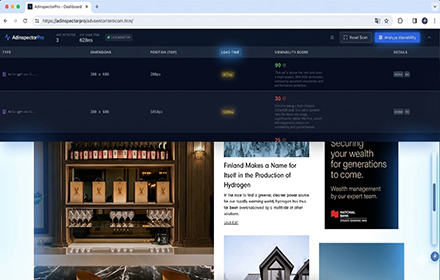
What you get on every page
The extension inspects the page structure to identify ad units and surfaces the details that help you spot issues quickly.
Slot dimensions & placement
See detected ad sizes plus where each unit sits on the page (positions and coordinates).
Element type clarity
Know what you’re dealing with: iframes, images, divs and other slot containers.
Estimated load timing
Spot slow-loading units and investigate the causes (render path, latency, creative weight).
Viewability analysis (optional)
Run “Analyze Viewability” to send technical slot data to Google Gemini for an assessment.
Built for debugging
Use it while developing, QA’ing, or triaging production issues across layouts and breakpoints.
Privacy-first by design
No PII collection. Processing is local unless you explicitly trigger Gemini analysis.
How it works
Fast feedback, minimal drama. The heavy lifting happens in your browser.
Scan the page
The extension analyses the page structure locally to detect ad slots and their characteristics.
Review slot diagnostics
Inspect dimensions, positions, element types and estimated load timing in the dashboard.
Optionally analyse viewability
Trigger “Analyze Viewability” to send technical slot data to Google Gemini using your own API key.
Privacy & data handling
The short version: we don’t collect your personal data, and we don’t run servers that hoover up browsing activity.
No central data collection
No personally identifiable information is collected, stored, or transmitted to AdInspector Pro servers.
Local storage only
Your Gemini API key and display preferences are stored in chrome.storage.local on your machine.
Gemini is opt-in
Only technical slot data is sent when you use “Analyze Viewability”. No URLs or page content are included.
Read the full policy: Privacy Policy.
FAQ
The stuff people ask right before installing. Or right after breaking something. Both valid.
Does AdInspector Pro collect personal data?
No. The extension does not collect, store, or transmit PII to our servers. Processing is local unless you choose to run Gemini analysis.
What exactly is sent to Google Gemini?
Only technical ad-slot data: dimensions and coordinates, window and total page height, and the HTML element type. No URLs, page content, or user-identifying data.
Where is my Gemini API key stored?
Locally in chrome.storage.local. It stays on your machine and is cleared if you uninstall the extension.
Can I use the extension without Gemini?
Yes. The core diagnostics are local. Gemini is only used if you click “Analyze Viewability”.
Install AdInspector Pro
Start diagnosing ad issues in minutes. Replace the placeholder link with your Chrome Web Store URL when ready.